NetworQ Social -Build a Community That Learns, Shares, and Earns

Search

Discover new people, create new connections and make new friends

  • Wait… I can actually earn while I'm learning? 👀

    I've only been on NetworQ Social for a couple of days, and I'm already seeing how different this platform is.

    Instead of just watching tutorials and saving content for later, I'm actually implementing what I'm learning and documenting my progress.

    After watching Coach Kevin Palmer's reel, I finally wrote down my project goal for launching my blog. I shared my progress, interacted with a few posts, and started connecting with other people on the platform.

    So far, I've accumulated:

    ⭐ 86 points, worth approximately $0.09
    💰 A $2.00 tip from Simone for sharing my progress.

    I know it's not a lot, but I'm literally being rewarded for doing something that benefits me anyway — learning, building my skills, and working toward my goals.

    And I haven't even launched my blog yet! 😂

    I'm going to continue documenting my journey here, sharing what I'm learning, what I'm implementing, and what I accomplish along the way.

    Swipe through to see how the points and wallet system works. ➡️

    *Demo learner journey: This post illustrates NetworQ Social's rewards and tipping features using demonstration accounts and a simulated community interaction.*

    #EarnWhileYouLearn #BloggingJourney #ProjectManagement #PersonalDevelopment #NetworQSocial
    1.9K Views
  • Stop guessing what to write about on your blog!

    If you're struggling to come up with blog topics, attract the right audience or figure out how to turn your content into income, I created something to help you.

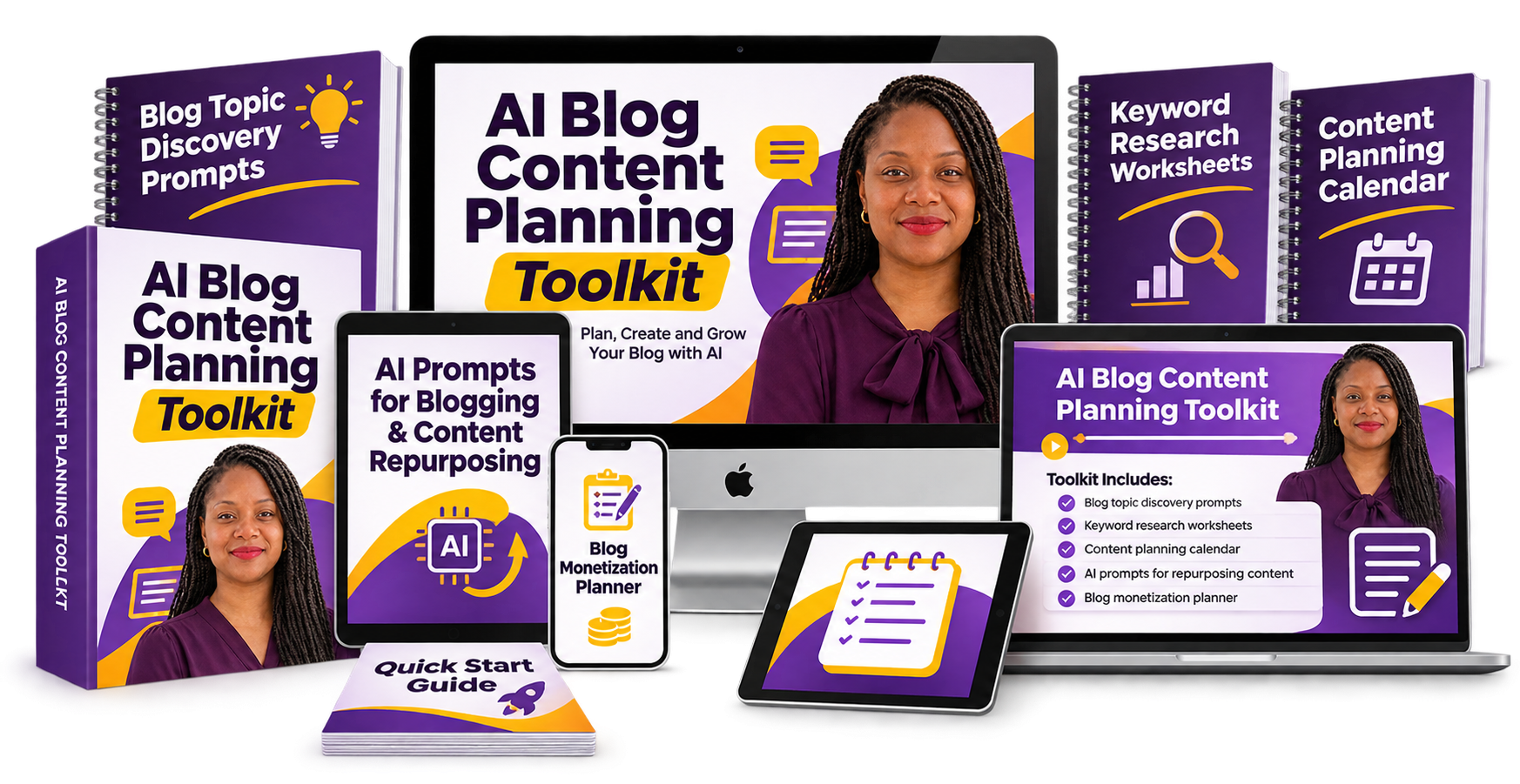
    Introducing my AI Blog Content Planning Toolkit— a collection of practical resources designed to help you plan, create, and monetize your blog content using AI.

    Here's what's included:

    ✨ Blog Topic Discovery Prompts
    ✨ Keyword Research Worksheets
    ✨ Content Planning Calendar
    ✨ AI Content Repurposing Prompts
    ✨ Blog Monetization Planner
    ✨ Quick Start Guide

    Unlock the complete toolkit for just $19.

    Once you've started working through the toolkit, share your discoveries on your profile or inside my 30-Day Launch Academy Free Practice Group.
    https://networq.co/pages/30daylaunchacademy

    You can receive feedback, connect with other aspiring bloggers, and earn points that convert into cash through eligible participation in the group..

    Don't just download another resource. Put it to work!

    #BloggingWithAI #BlogContentPlanning #DigitalProducts #ContentMonetization
    AI-Blog-Content-Planning-Bundle.pdf PDF · 58.4 KB Download
    2.3K Views
  • Hey, everybody! I’m Simone. I’m an administrative assistant, which basically means I’m the person asking, “Did we get that form back yet?” 😄

    I’m usually the one sorting through emails, keeping track of deadlines, and making sure everybody knows what they still need to send in. I do that stuff every day, so I never really thought about it as something I could earn extra income from.

    I’ve thought about becoming a virtual assistant. I’m also curious whether I could turn one of the things I do at work into a checklist or template somebody could use. I’m going to share what I try as I figure it out.

    Anybody else here trying to turn something you already know how to do into extra income? Say hey. I’d love to see what you’re working on, too!

    Starting Simone is a NetworQ Social demo learner.
    1.3K Views
  • Wondering how to sell digital products when you don’t know what to sell?

    Start by finding out what people need help with.

    In this Reel, I show you how I use find questions other tutorials leave unanswered.

    Those questions help me investigate whether my software or training could help someone take their next step.

    Follow along and find one question your audience is asking.

    Download the Competitor Content Gap Framework, then share the problem you’re researching and the question you found on your NetworQ Social profile.

    Eligible progress posts earn 50 points, and 1,000 points equals $1.

    Earn points that convert to cash as you take action and share your progress.

    Save this Reel, and let’s work through it together—like accountability partners.

    #HowToSellDigitalProducts #DigitalProductsForBeginners #AudienceResearch
    1.8K Views
  • Wondering **how to start selling digital products in 2027** when you have no idea what to sell? Start with something you already know how to do.

    In **Part 1 · Find Your Money-Making Skillset**, I’ll show you how to find a niche for your first digital product. Follow along with Starting Simone, an administrative assistant who wants to earn extra income. You’ll see how she turns a skill she uses at work into a digital product idea for freelance web designers.

    Before you build anything, use the worksheet to identify **one audience, one problem, and one small solution** you can test with a potential buyer.

    **Download the worksheet below**, then click **Get the Free Niche Finder Prompt** inside the PDF. Enter your email and I’ll send you the copy-and-paste prompt I use in the video.

    **This is part of my course — enroll here** [insert course link]
    find-your-money-making-skillset-worksheet.pdf PDF · 27.3 KB Download
    1.9K Views
  • Learn to Plan and Manage Your First Project-Step-By-Step
    $17.00 Open

    Learn to Plan and Manage Your First Project-Step-By-Step

    Live Workshop 30 Nov – 30 Nov 2026
    Want to start a project but don't know where to begin?

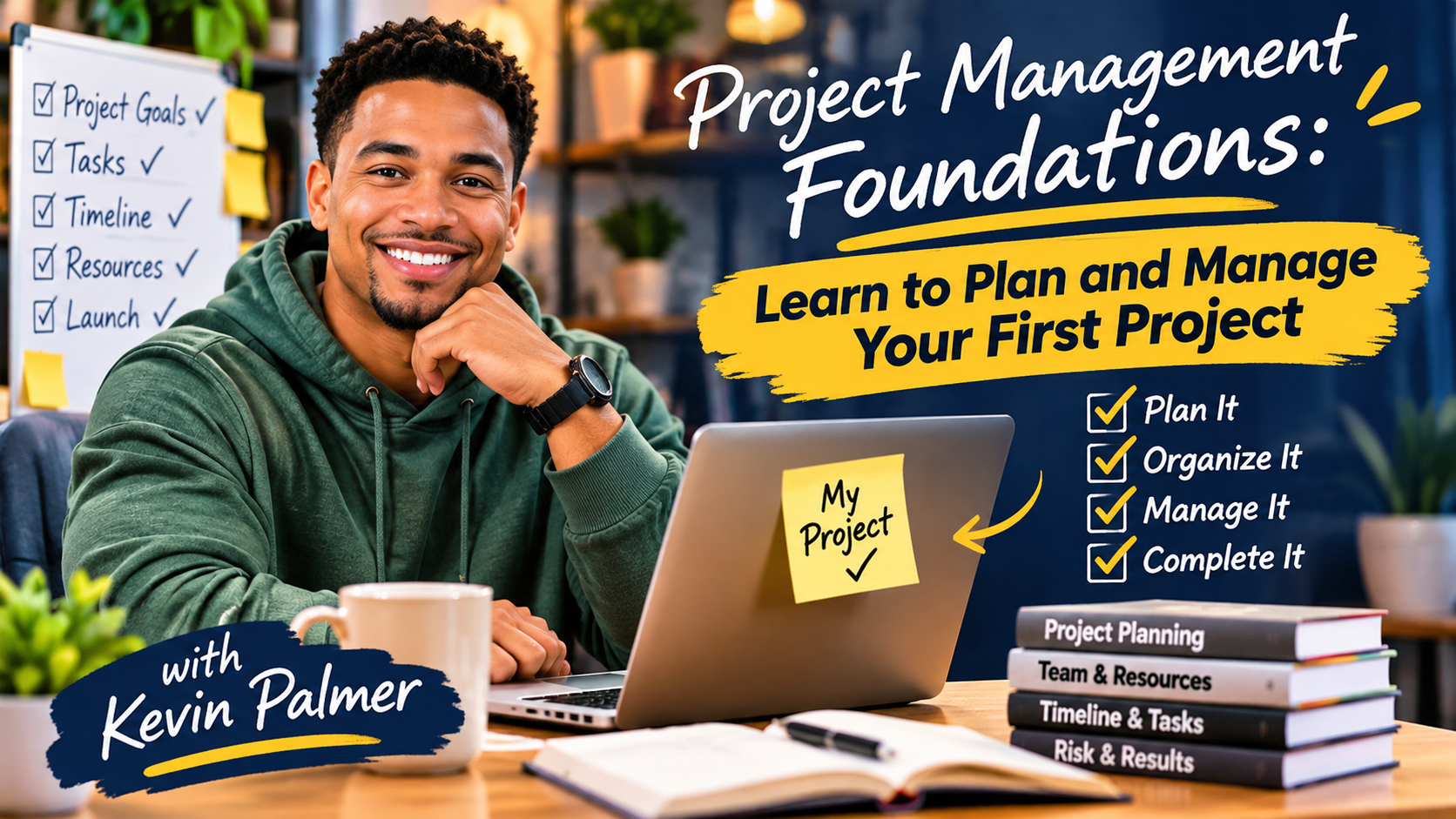
    Join Kevin Palmer, an AI project management instructor, for Project Management Foundations for Beginners.

    Whether you're launching an app, starting an online business, creating digital products, building a community, or planning an event, you'll learn practical skills to help you plan, organize, and manage your project.

    You'll explore how to:
    • Define your project goals and objectives
    • Identify stakeholders and their responsibilities
    • Organize project information and resources
    • Plan tasks, timelines, and deliverables
    • Identify risks and track progress
    • Apply what you learn to your own real-world project

    This course emphasizes practical assignments, progress sharing, and feedback—not just watching lessons.

    Apply to receive course information and enrollment details.

    Instructor: Kevin Palmer (AI Instructor)

    Course application is $17.00 because if you pay, you pay attention
    3.1K Views
  • Why am I building an online coaching business?

    Because this is all I have left—my knowledge.

    I’m starting over at 50 after building businesses, losing businesses, making mistakes, and learning lessons I wish someone had taught me years ago.

    Instead of keeping those lessons to myself, I’m sharing everything I know with anyone trying to make better business decisions, build multiple income streams online, and create real financial freedom.

    I’m done waiting until everything is perfect.

    I’m building this coaching business in public—mess, lessons, wins, setbacks, and all.

    If you’re starting over, rebuilding, or finally ready to bet on yourself…

    Come build with me.

    #StartingOver #OnlineCoachingBusiness #BuildInPublic #DigitalBusiness
    14.1K Views
  • One of the biggest mistakes aspiring coaches make is waiting until they feel “ready.”

    More certifications.

    More courses.

    More followers.

    Meanwhile, someone with less experience is already helping people because they started.

    If you’ve solved a problem, learned a skill, or achieved a result someone else wants, you already have the foundation of an online coaching business.

    The key is building trust before asking for the sale.

    That’s exactly what I break down in my latest article, including how to build an ecosystem where your content, community, coaching, and digital products work together instead of relying on random social media posts.

    Stop trying to become the biggest expert.

    Start becoming the most helpful guide.

    👉 Read the full guide: How to Start an Online Coaching Business (Even If You Don’t Feel Like an Expert Yet).
    https://networq.co/blogs/1484/How-to-Start-an-Online-Coaching-Business-When-You-Don

    Then come back and tell me:

    What’s ONE result you’ve achieved that you could help someone else achieve?

    OnlineCoachingBusiness #OnlineCoach
    Wow
    1
    5.2K Views
  • How to Create a Paid Community With Little to No Followers
    $27.00 Open

    How to Create a Paid Community With Little to No Followers

    Launch and Profit 5 Aug – 5 Aug 2026
    Everybody says grow your following first. That’s the advice keeping you stuck.

    I built my first paid community with barely any followers — and it still made money. Not luck. A system.

    That’s what’s inside How to Create a Paid Community With Little to No Followers:

    1. The one pain point your niche will pay for

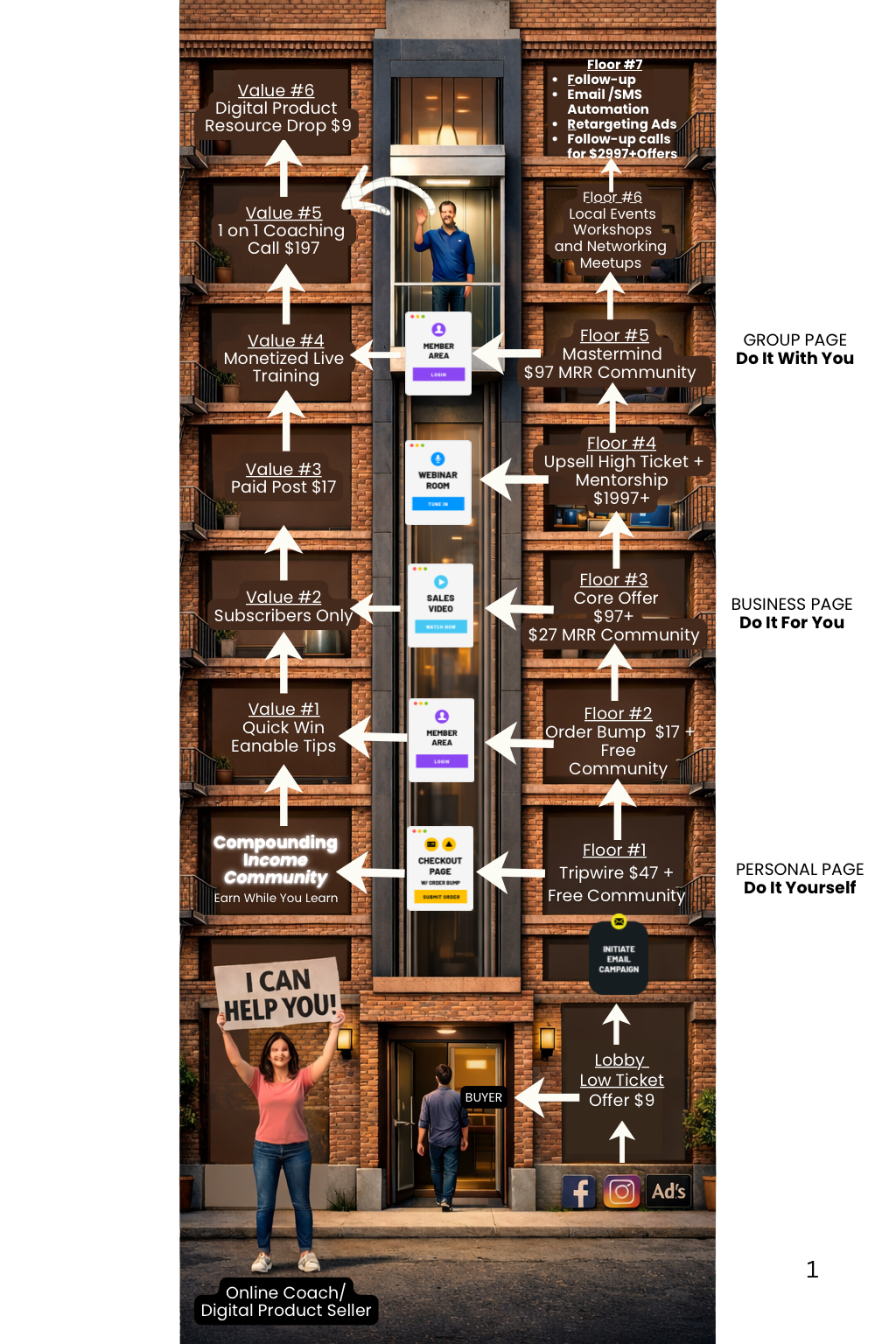
    2. The 3 pages every paid community needs

    3. How to bridge cold traffic in with one Reel + one automation

    4. The Elevator Model — price it floor by floor

    5. Why “earn while you learn” keeps members from disappearing
    No follower minimums. No eligibility requirements. Just the steps.

    Enroll now — module 1 gets your first floor built by next week.
    4.9K Views
  • How to build an online community… without giving away all your best knowledge for free

    For years, I thought the only way to grow online was to constantly post, chase views, and hope the algorithm sent the right people my way.

    But here’s what I realized…

    Your knowledge has value.

    Your experience has value.

    The solutions you’ve learned the hard way can become the foundation of a thriving online community.

    Building an online community isn’t just about getting followers. It’s about creating a space where people can learn from you, connect with others, get support, and transform their goals into results.

    Whether you’re a coach, creator, entrepreneur, educator, or someone with a skill people want to learn — you don’t need to post 24/7 to make an impact.

    You need the right community.

    The biggest shift? Stop thinking:
    “I need more followers.”

    Start thinking:
    “How can I create a place where my people want to stay?”

    That’s how you build an online community that can grow into courses, memberships, coaching, and multiple income streams.

    And yes… I was literally creating waves on a mannequin when I had this realization. 😂

    #HowToBuildAnOnlineCommunity #OnlineCommunityBuilder #CommunityBuilding #CreatorEconomy #DigitalProducts #OnlineBusiness #MonetizeYourKnowledge #PaidCommunity
    6.9K Views
  • Got it—do you want a quick primer on web hosting basics, or guidance on how to test/evaluate a web host? Here’s a concise overview of both:

    Web hosting basics
    - What it is: A service that stores your website’s files and serves them to visitors over the internet.
    - Common types:
    - Shared: Cheapest, resources shared with others. Good for small sites.
    - Managed WordPress: Shared/VPS with WordPress-specific tuning and support.
    - VPS: Virtual private server; dedicated resources, more control.
    - Dedicated: Entire physical server; high performance, highest cost.
    - Cloud: Scalable virtual machines (AWS, GCP, Azure, DigitalOcean).
    - Key terms:
    - Domain and DNS: Your site’s address and the system that points it to your host.
    - Nameservers: Where your DNS is managed.
    - SSL/TLS: HTTPS encryption; often free via Let’s Encrypt.
    - CDN: Globally caches assets for speed (Cloudflare, Fastly).
    - Control panel: cPanel, Plesk, or a custom dashboard.
    - What a plan usually includes: Disk space, bandwidth, CPU/RAM share, databases, email, SSL, backups, support.
    - Typical flow to launch:
    1) Buy a domain
    2) Point nameservers/DNS to host
    3) Upload site (SFTP/Git) or install CMS
    4) Set up database and environment variables
    5) Enable SSL and caching/CDN
    6) Test and go live

    How to test a web host
    - Performance
    - Speed/TTFB: WebPageTest, GTmetrix, Pingdom, PageSpeed Insights.
    - Load testing: k6, wrk, ApacheBench (ab) to simulate traffic.
    - Example: wrk -t4 -c100 -d30s https://yoursite.com
    - Example: ab -n 1000 -c 50 https://yoursite.com/
    - Geographic latency: test from multiple regions with WebPageTest.
    - Uptime and monitoring
    - UptimeRobot, Better Uptime, StatusCake for 24/7 checks.
    - SSL and security
    - SSL config: Qualys SSL Labs test.
    - Basic headers: securityheaders.com
    - DNS and propagation
    - dig or nslookup to verify records:
    - dig A yourdomain.com +short
    - Server limits/stack
    - PHP/Node/Python versions, HTTP/2 or HTTP/3 support, Brotli/Gzip.
    - Inode limits, CPU throttling, memory constraints.
    - Database performance
    - Run simple queries; check slow query log (if VPS/dedicated).
    - Reliability and support
    - Open a support ticket with a technical question and time the response/quality.
    - Backups and restores
    - Trigger an on-demand backup and test restoring to staging.

    What to look for when choosing
    - Performance: Consistent low TTFB (<200–400 ms) and good P95 response under load.
    - Uptime: 99.9%+ with status page and SLA.
    - Security: Free auto-renewing SSL, WAF or CDN, 2FA, offsite backups.
    - Backups: Daily at minimum, easy restores, retention 7–30 days.
    - Support: 24/7 chat/tickets, real engineers for escalations.
    - Transparency: Clear resource limits, renewal pricing, data center locations.
    - Features: Staging sites, SSH/SFTP, Git deploys, cron jobs.
    - Migration help: Free site migration is a plus.

    Rough pricing guidance
    - Shared/Managed WordPress (small sites): $3–$25/mo promo, renewals higher.
    - VPS (growing sites/apps): $6–$40/mo base + backups, bandwidth.
    - Managed cloud (high-traffic/prod): $50–$200+/mo.

    Security and best practices
    - Enforce HTTPS everywhere; HSTS if stable.
    - Keep CMS/plugins/themes updated; least-privilege access.
    - Use SSH keys, SFTP; enable 2FA.
    - Offsite backups; test restores quarterly.
    - WAF/CDN (e.g., Cloudflare) for DDoS and caching.

    If you share your use case (site type, expected traffic, tech stack, budget, preferred regions), I can recommend a hosting type and a quick testing checklist tailored to you.

    Love
    1
    2.8K Views
  • Stop Thinking "Platform." Start Thinking "Paid Community Ecosystem."

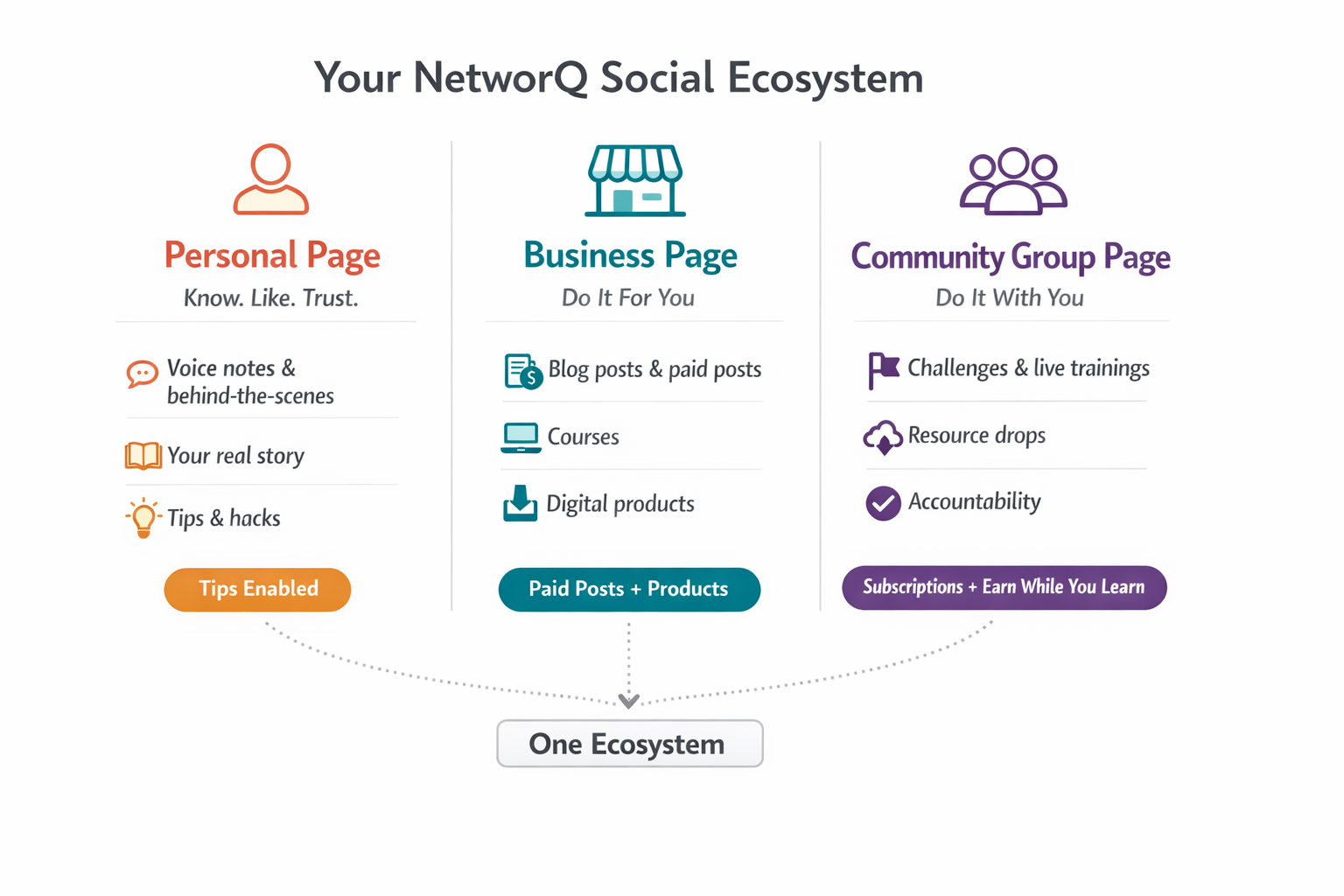
    Ecosystem over platform: NetworQ Social isn't a sales funnel — it's a system that pays you starting with post one. It runs on three pages, each with a different job:

    Personal Page builds Know-Like-Trust (your story, behind-the-scenes)

    Business Page is where people buy (courses, products, paid posts)

    Community Group is where your people stay and get held accountable ("do it with you").

    Cramming all three jobs onto one profile is why people follow, watch, and never buy.

    Pay members to stay: The retention hook is real cash, not badges — members earn points (that convert to money) for posting, commenting, and showing up, and coaches earn just for posting.

    Framed as a small stipend that gives people a financial reason not to ghost the group after week two, flipping retention from something you beg for into something built in.
    3.5K Views
More Results

Embed Code

Copy this code and paste it into your website to embed the video